Process documentation for teams
Step-by-step guides and narrated videos, in minutes
Onboard new hires, train customers and document every process, all from one recording.
Start free. No credit card required.
 Narrated video
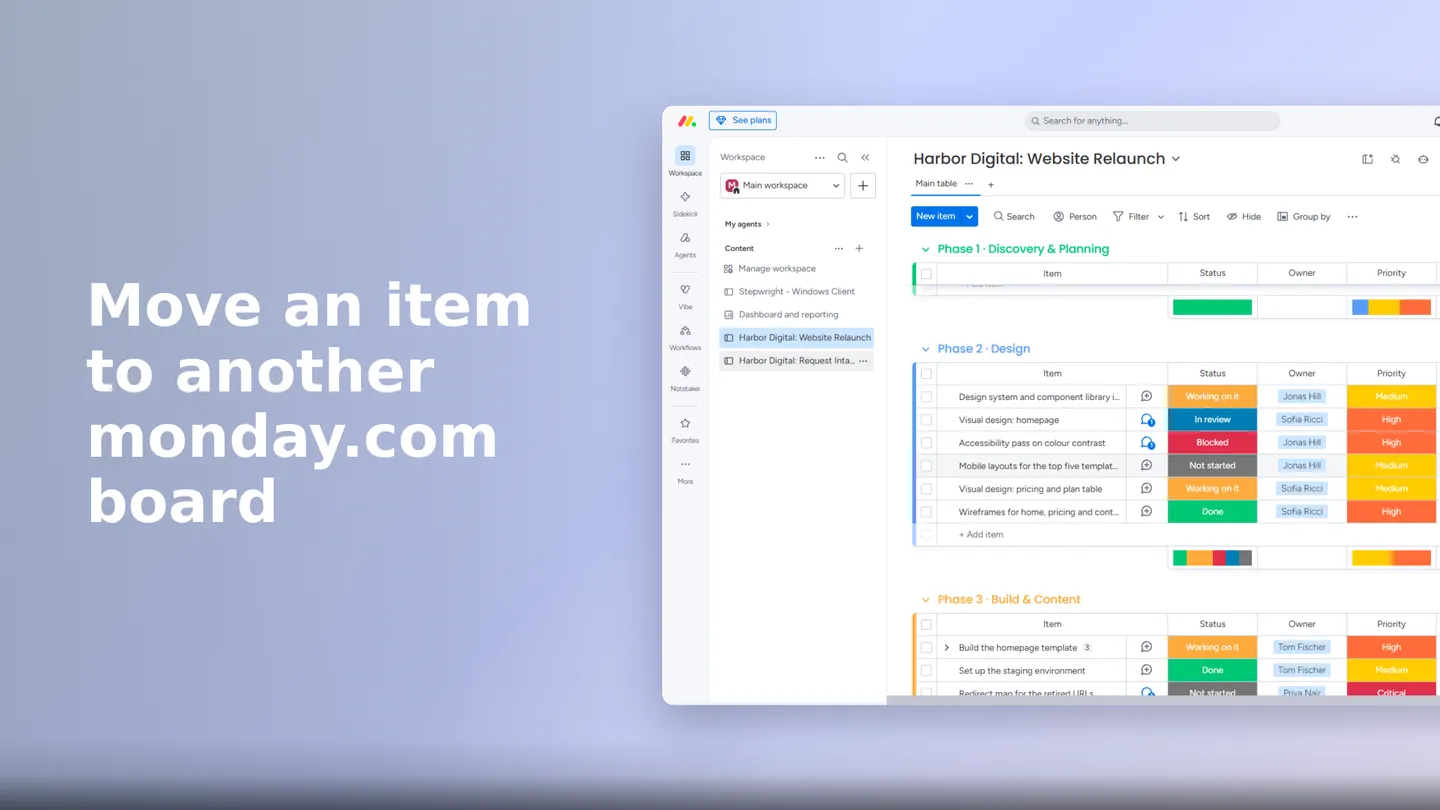
 Move an item to another monday.com board
- Open the source board
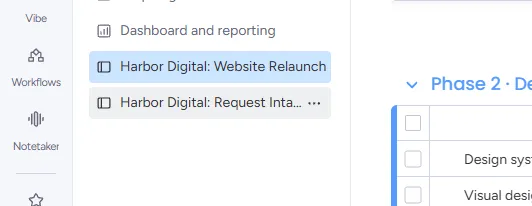
- Open the item context menu
- Select Move to board
- Set the target board
- Confirm the move
- Chrome and Edge extension
- Windows desktop recorder
- Guides in 28 languages
- Automatic redaction on Teams
- Hosted in Germany
Three steps. No writing, no editing timeline.
You do the work the way you always do it. Stepwright does the documentation.
Do the process once
Hit record and click through the workflow in your own tools. Talk while you go if you like; you don’t have to.
 Recording in Chrome · 3 steps captured so far
 Stepwright writes and narrates
Screenshots, highlights and instructions become a clean guide. The same steps become a narrated video, in the guide’s language.
Share with the people who need it
Publish to your team space, export to Word or PDF, or embed the video in Notion or Confluence.


Narrated video
A training video nobody has to film.
Every guide on Pro and Teams is also a video: each step on the screen it happens on, the button it talks about picked out, a voice reading the instruction. Fix the guide and the video is already fixed.
- Six voices, each speaking 19 languages; captions in all 28
- Download as MP4 or embed with its own link
- Translate the guide on Teams and each language gets its own video
Guide Me
Guidance that follows you into the real app.
Instead of switching between a document and the work, Guide Me highlights the next step on the page you’re on. Try it below in a stand-in app.
That's Guide Me
Nothing to read first, no switching between a document and the screen. Your team follows guides exactly like this on your real tools, with each step highlighted live.
Every menu item works. Have a look around.
Guide Me itself is a Chrome and Edge extension, so the real thing runs on a desktop. This demo re-creates it on the page, which is why it works here too.
Just talk
Explain it out loud. Stepwright writes it down.
Say why a step matters while you do it. Your words become the step’s context; nothing to type afterwards. Put your product names and internal terms into a vocabulary on Teams, and the transcription gets them right every time.
“Always approve in Fernbrook before the supplier gets the PDF…”
Stays current
Update the step that changed, not the guide.
A button moved? Re-record that one step. The guide, its translations and its video all match again.
Security and privacy
Your processes stay yours.
Your workflows are your business. We just help you document them.
Redact sensitive data
The browser extension hides passwords, one-time codes and card fields as it captures. On Teams, personal and health data can be redacted automatically too.
Encrypted in transit and at rest
Recordings and guides are encrypted on our servers and never leave your control.
Private by default
Guides are only visible to you until you decide to share. No public indexing, no surprise exposure.
Pricing
The people who only read shouldn’t be the expensive part.
Teams includes 50 authenticated viewers. Extra viewers cost less than half an editor seat. Spaces and translation are included, not held back for an enterprise plan.
Free
Try it at your own pace.
0€ forever
No credit card required
Create free account- 5 guides included
- Browser and desktop recording
- Share via link
- Guide Me preview
Pro
For one person who documents a lot.
30€ 25€ / month
billed monthly billed yearly
Start 14-day free trial- Unlimited guides
- Narrated video for every guide
- Screenshot editing and redaction
- Word, PDF, HTML and Markdown export
- Your branding on guides
Teams
For teamsFive editors and 50 viewers, one price.
180€ 150€ / month
billed monthly billed yearly · covers the first 5 editors and 50 viewers
Start 14-day free trial- Everything in Pro
- 5 editors and 50 authenticated viewers
- Team spaces with access control
- Guide and video translation, 28 languages
- Guide Me and Pin Me
- Automatic personal and health data redaction
- Extra editors 12€/month Extra editors 10€/month, billed yearly
Pro and Teams start with a 14-day trial. A card is required, and you can cancel any time in the first 14 days without being charged.
Questions, answered.
Anything else, ask us in the chat. A person replies.
If it happens on a screen, yes. The browser extension covers web apps on Chrome and Edge, the Windows recorder covers desktop software, and both produce the same guide and video.
No. Stepwright writes the steps from what you click. Talking while you record adds context, and the video narration is generated from the finished guide, not from your voice.
It regenerates to match. There is no separate file to re-cut and no way to end up with a video showing a step the guide no longer has.
Someone who signs in to read or watch guides but does not create or edit them. Teams includes 50. Extra viewers cost 5€ a month, or 3€ a month billed yearly: under half an editor seat on monthly billing, under a third on yearly.
About as long as doing the process once. Guide and video are ready in minutes after you stop recording.
The browser extension runs on Mac, so anything that happens in a browser tab is covered. The desktop recorder, which captures native applications and remote sessions, is Windows only for now.
Document the process while you do it.
Your first guide takes minutes. The free plan needs no card.